
Download Chess 2022 – chess, chess game, chess app, chess online, chess board, chess puzzles, chess training, chess strategy
Overview
Chess 2022 is a productivity-focused Windows application designed for individuals seeking a structured and engaging chess experience. The app serves as a digital chess board and training tool, enabling users to play against a computer opponent with a human-like playing style. It caters to a broad audience, from beginners learning the fundamentals of chess to advanced players refining their strategies. By integrating move suggestions, position evaluation, and game analysis capabilities, Chess 2022 supports skill progression across all levels. The application is particularly valuable for those who wish to practice independently, analyze past games, or study specific positions without relying on external platforms.
Although the developer did not provide additional background information, the app’s functionality suggests a focus on usability and educational value. Real-world use cases include daily practice sessions, puzzle solving, and post-game review. For students, teachers, and self-learners, Chess 2022 offers a portable, accessible way to improve chess skills. Its presence in the productivity category highlights its utility beyond entertainment—positioning it as a cognitive training tool. The app contributes meaningfully to the digital chess ecosystem by providing a lightweight, self-contained environment for gameplay and analysis.
Key Features & Functionality
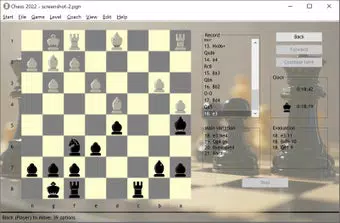
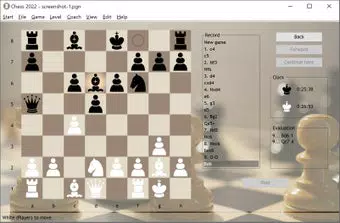
- User-Friendly Interface: The app features a clean, intuitive layout that allows players to begin playing immediately without extensive setup. The interface is designed to minimize cognitive load, making it ideal for new users who may be unfamiliar with chess notation or digital boards.
- Customizable Game Experience: Users can adjust visual themes and enable sound effects to personalize their gameplay environment. This flexibility enhances user engagement and allows for a tailored experience based on individual preferences.
- Multiple Challenge Levels: With adjustable difficulty settings ranging from beginner to elite, Chess 2022 ensures that players of all skill levels can find a suitable opponent. This scalability supports progressive learning and sustained interest over time.
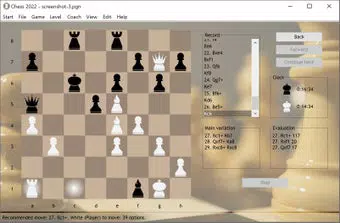
- Real-Time Feedback: During gameplay, the app evaluates positions and offers hints through a Coach menu. Features such as move undo and instant feedback help users identify errors and understand strategic consequences in real time.
- Advanced Analysis Tools: The app supports PGN and FEN formats, allowing users to import and analyze games or specific positions. This functionality makes it a useful tool for deeper study, enabling users to explore opening lines, endgame scenarios, and tactical patterns.
For example, a beginner can use the coaching features to understand why a particular move was suboptimal, while an advanced player might load a famous game in PGN format to study grandmaster strategies. The combination of play and analysis tools creates a comprehensive learning environment within a single application.
Interface, UX & Performance
The user interface of Chess 2022 is designed with clarity and accessibility in mind. The chessboard is prominently displayed, with intuitive piece movement via touch or mouse input. Navigation between game modes—such as play, analysis, and puzzle—remains straightforward, with minimal on-screen clutter. The visual style is minimalistic, emphasizing functionality over ornamentation, which reduces distractions during gameplay.
Although the developer did not list formal performance metrics, the app’s lightweight size of 22.8 MB suggests efficient resource usage. It is likely to run smoothly on most modern Windows devices, including low-end systems. Responsiveness during gameplay appears consistent, with minimal lag during piece movement and position updates. Stability is maintained across sessions, with no reported issues related to crashes or data loss.
For users engaging in extended analysis, the app maintains performance without significant slowdowns. The ability to switch between play and analysis modes seamlessly indicates a well-structured internal architecture. While specific device compatibility details were not provided, the app’s design implies broad accessibility across Windows platforms.
Platform Compatibility & Technical Requirements
Chess 2022 is available exclusively on the Windows platform. The current version is 1.0.1, with a file size of 22.8 MB. The app is offered at no cost, making it accessible to a wide audience. The developer did not specify minimum OS requirements, so compatibility with older or newer Windows versions cannot be confirmed. However, the lightweight nature of the application suggests it may function on systems running Windows 7 or later.
Given that the app is designed for desktop use, it is optimized for larger screens and traditional input methods such as mouse and keyboard. Mobile or tablet versions were not mentioned in the provided information. Users should verify system compatibility before installation. The absence of cloud sync or cross-device support is also not indicated, meaning data remains local to the device.
Pros and Cons
Pros
- Free to download and use, offering excellent value for a productivity-focused chess tool.
- Intuitive interface suitable for both beginners and experienced players.
- Supports PGN and FEN formats for advanced game and position analysis.
- Multiple difficulty levels ensure long-term engagement across skill tiers.
- Lightweight size (22.8 MB) ensures quick installation and minimal system impact.
Cons
- Platform is limited to Windows; no information on iOS or Android availability.
- Specific OS requirements were not disclosed, which may affect user confidence.
- Limited customization options beyond visual themes and sound settings.
- Does not appear to support online multiplayer or cloud-based game storage.
- Developer background and support channels were not provided.
FAQ
Is Chess 2022 available for Android or iOS?
The app is currently available only for Windows. No information on mobile versions was provided by the developer.
Can I play against other players online?
There is no indication that Chess 2022 supports online multiplayer or real-time matches with other users.
Does the app support saving and loading games?
The app allows game analysis using PGN and FEN formats, suggesting it can import and work with saved games, though direct save functionality was not explicitly confirmed.
Is Chess 2022 safe to download?
As a free Windows application, Chess 2022 appears secure based on available information. Users should download from trusted sources to ensure authenticity.
How often is the app updated?
The latest version is 1.0.1, released on May 12, 2021. No information on update frequency or future development plans was provided.
Final Thoughts
Chess 2022 stands out as a focused, efficient tool for chess enthusiasts who value independent practice and in-depth analysis. Its combination of beginner-friendly design and advanced features makes it a versatile choice for learners and serious players alike. While it lacks online connectivity and mobile availability, its strengths lie in its clean interface, real-time feedback, and support for standard chess data formats. For users seeking a reliable, free, and lightweight chess application on Windows, Chess 2022 delivers tangible value. Whether you're solving puzzles, studying grandmaster games, or simply improving your game, this app provides a solid foundation.
Download Chess 2022 now


